m9b · part 5 of 6
Two USB ports, one engine
The board’s only USB port belongs to the programmer. To plug in a keyboard and a mouse, the FPGA has to be a USB host itself, with nothing but its own pins, and on a chip this full, two ports had to share one host.
A host from bare pins
The Tang Nano 9K’s USB-C port goes to a BL702 microcontroller that acts as the JTAG programmer and serial port. It’s a USB device, like a keyboard, and two devices can’t talk to each other.
A full USB host controller is a large piece of hardware. But keyboards, mice and gamepads can all fall back to the oldest and slowest mode: low speed, 1.5 Mbit/s, with a simple fixed report format called the boot protocol. At that speed, ordinary 3.3 V pins will do. Each USB-A socket’s D+ and D− go straight to two header pins, and power and ground come from the header too. And each data line gets a 15 kΩ resistor to ground, as the USB specification asks of a host. Remember those resistors.
Low-speed USB, briefly
- Attach: a low-speed device pulls D− up through 1.5 kΩ. That’s how the host knows something is plugged in, how fast it is, and, as it turned out, which wire is which.
- Bits are sent as changes: a 0 flips the lines, a 1 leaves them alone, and after six 1s a 0 is stuffed in so the receiver always has edges to lock onto.
- Packets start with a sync pattern and a packet ID, and end with both lines driven low for two bit times.
- Keep-alive: once every millisecond the host sends a short pulse, or the device suspends after 3 ms.
- Enumeration: the host resets the bus, asks the device what it is, gives it an address, picks its configuration and asks for the boot protocol. Then it polls: a keyboard answers with 8 bytes (modifier keys and up to six keys held), a mouse with its buttons and how far it has moved.
A host made of microcode
Doing all that in plain logic would take a big state machine. nand2mario’s usb_hid_host does something smarter: it’s a tiny processor with its own small instruction set, running a microcode program from a ROM. It runs at 12 MHz, eight clocks per bit on the wire; the microcode does the reset, the enumeration, the polling and the timing, and the logic around it only shifts bits in and out.
m9b started with one copy per port, then shrank them in three steps.
One ROM
Two cores meant two copies of the microcode, each in its own block RAM. But a block RAM has two read ports, and the microcode never changes, so both cores read the same ROM, one port each: one block RAM instead of two, at a time when there were only a couple left.
Smaller cores
- The 1 ms frame timer moved out of the core and became one timer for both ports.
- The watchdog counts frames instead of 12 MHz cycles: 10 bits instead of 24.
- The microcode program counter is 10 bits instead of 14: the program is 536 four-bit instructions.
- Upstream decodes each report by device type into key, mouse and gamepad outputs. The core now just keeps the last report’s first six bytes as they came, and software decodes them.
That saved about 90 logic cells and 165 registers for the two ports. A differential simulation against the previous core, with random device traffic, matched cycle for cycle except for the watchdog’s new timeout.
One engine for both ports
The microcode spends most of its life waiting for the next 1 ms frame, and across that wait only a little state is live: its program counter, return address, one working register and a connected flag. So when the running port reaches a wait and the other port has a frame pending, the engine swaps that state with the other port’s saved copy and runs the other port. It’s a context switch, in hardware, between two microcode threads.
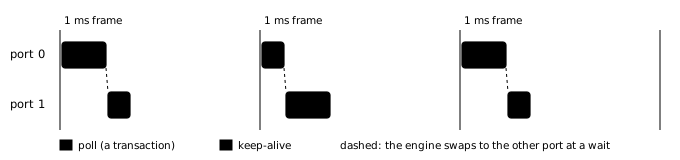
Each port keeps what has to survive across frames: its own bus drive (a bus reset holds the lines low across several frames), its watchdog and its device type. The descriptor and report buffers are shared: descriptor fields are checked within one burst of transactions, and each port’s registers copy the report bytes within cycles of their arrival.
Sharing needed one new rule. Upstream’s core waits up to its watchdog (now 768 ms) for a device that doesn’t answer; with one engine, that would freeze the other port too. A new transaction timeout, 2,048 cycles (about 170 µs) from the start of a transaction, sends a silent port back to the start of its program. One engine instead of two saved another 136 logic cells and 150 registers. A simulation with two low-speed device models covers it: keyboard and mouse, a dead device on either port, nothing plugged in, unplug and replug.
What the CPU sees
Each port is a handful of registers: the device type, a report counter, and the last report’s bytes. Mouse motion is also summed in hardware into a running position, so a game that looks once a frame loses none of the reports in between. Every report can raise an interrupt. The games compare each keyboard report with the previous one to make key presses and releases.
Fun bugs
It was the connector
Getting USB to work took many rounds, and the core was right the whole time. The USB ports are the only bit of hardware that was added to the Tang Nano 9k, and as with all things hand-soldered one of them obviously had a bad contact leading to a significant amount of wasted time.
What came out of it is a set of small diagnostic programs, loaded over the serial port: one shows which wire is pulled up and where the microcode spends its time, another records every change on the bus for 600 ms.
The keyboard that thought it was PS/2
My favourite keyboard happens to be a classic mechnical Cherry keyboard that is still manufactured, but hasn’t fundamentally changed over the decades. Unusually for a modern keyboard, it still comes with a passive PS/2 adapter in case you still happen to live in the 90s. It decides which at power-up by looking at the data lines: on a USB host, 15 kΩ pull-downs hold them low; on a PS/2 port, both are pulled high.
In the interest of saving hardware I’d left the 15k resistors out, relying on the FPGA’s internal pull-downs to do the job. But while the FPGA loads its configuration, its pins have weak pull-ups. So at power-up the keyboard saw both lines high, decided it was on a PS/2 port, and never spoke USB again until unplugged. It even broke flashing: with that keyboard on the pins, loading a new design failed its CRC check every time, which looked exactly like a broken bitstream.
The fix was to get a cheap modern keyboard, which you see in the videos.
The bill
The two ports cost about 490 logic cells and one block RAM, for the shared microcode. With one ROM but two separate cores, before the other two steps, they took about 720.